Technical chit-chat, leaning boldly towards work-issues.
Chrome
Get link
Facebook
X
Pinterest
Email
Other Apps
Yep, I tested the Google Crome and V8 also. But as there are somanyreviews alreadyfloating in 'net, I'll just state: Google has entered nicely into browser war!
Summer is approaching, Qt 5.12.2 is out and we wanted to again get concrete painting performance numbers on some lower end embedded SOC GPUs. The kind of chipsets which people are using for embedded devices in multiple places. If user interface contains dynamically painted elements and target is 60fps (or maybe 30fps), how much could you actually paint and which Qt technologies to reach out? To do this testing in easily approachable way, we grabbed 3 cheaper Android™ tablets with different GPUs for testing. Other option would have been different development boards, but those need a bit more setup time and time-to-market (or time-to-blog.. ;-) ) is important to all of us. We also wanted to give Qt 5.12.2 a go while it's hot. So let's first introduce the tablets & chipsets used for this testing: 1) Lenovo Tab 7 Essential, MediaTek MT8167D, GPU: IMG PowerVR GE8300 . This GPU is exactly the same which e.g. Renesas D3 uses, so if you are into automotives this GPU may be ...
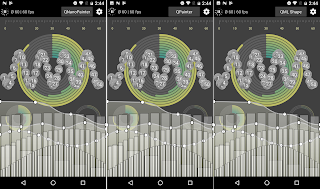
When implementing component into QtQuick UI which needs something more than rectangles, images and texts, pure declarative QML hasn't been enough. Popular choices to use for items with some sort of vector drawing are QML Canvas , QQuickPaintedItem or QNanoPainter . But with Qt 5.10 there will be supports for new Shape element with paths that contain lines, quads, arcs etc. so I decided to install Qt 5.10 beta3 and implement all tests of "qnanopainter_vs_qpainter_demo" with also QML + Shape elements. ( This kinda makes it "qnanopainter_vs_qpainter_vs_qmlshape_demo" but not renaming now ). So here is in all glory the same UI implemented with QNanoPainter (left), QQuickPaintedItem (center), and QML+Shape (right): Hard to spot the differences right? If only there would be a way to prove this, some way to x-ray into these UIs... like QSG_VISUALIZE=overdraw to visualize what Qt Quick Scene Graph Renderer sees? Here you can see that scene graph sees QNan...
Qt World Summit is just about to start! I’m not participating this time, but wanted to contribute one-more-thing to discuss in UI groups at the heart of Berlin ;) During the past about six months we at QUIt Coding have had a side-side-project called QNanoPainter. This library is designed for implementing custom QQuickItems into Qt5 scene graph. Currently if you want to implement custom Qt Quick item, options are at least: QQuickItem : Offers best performance due to Qt5 scene graph integration. But QSG* classes are relatively low-level with vertices, indices & materials. Painting more complicated things requires quite an expert and even then productivity is not very high. QQuickFramebufferObject : This is a good option if you want to draw with OpenGL into QQuickItem. But as we all know, OpenGL is also quite low-level API so no productivity wins here. QQuickPaintedItem : This means painting with good old QPainter C++ API. Weakness of QPainter with modern graphics accelerated ...


Comments