Posts

Showing posts with the label hacking

FitGraph NG UI prototype

Image
About a month ago I started exercising more, mostly jogging, weights and soccer (with kids). Target is to be in superb shape when 2018 starts, and I'm already feeling stronger & more energetic during the day so looking good! Anyway, this blog post is somewhat related to that. There's plenty of health-related apps and gadgets available these days and in the past I used some time pondering what would be a perfect activity tracking app for my needs. Now I decided to revive this earlier concept as 'FitGraph NG' while porting it to use QNanoPainter and polishing some parts. As usual, let's start with a video demonstrating the actual application: There would of course be more views available, this being just the 'activity timeline' part, but it would already cover many of my initial wishes: Showing the whole day as a graph, data or textually depending on needs. Automatic annotation of activities, type, duration and related activity data. And impo...

Unity testing

Image
Couple weeks ago I decided to study a bit about Unity  as I haven't worked with it before. So implemented a simple "Rock Rolling in Terrain" game prototype as a case study, looking like this: By coincidence Marko also just made a nice blog post related to Unity , and thanks to standard assets his terrain even looks quite similar to mine so not going to repeat similar notes. But all in all my initial feeling is that Unity seems quite productive environment and wouldn't mind implementing some bigger project with it to get deeper.

QML and Recursive Shaders

Image
Let's say that you want your Qt5/QML UI to contain sort of a graph. Instead of presenting just the current value, your want user to see few seconds into history how the value has changed. Something like this: To implement the above component with Qt5 & QML, there are at least 3 possibilities: 1) Use QML Canvas and draw the graph using JavaScript. 2) Use QQuickPaintedItem and draw the graph using C++ QPainter APIs. 3) Use QQuickItem and draw using OpenGL and QSG* helpers. First of these is "easiest", no C++ is required but performance and features go along HTML5 canvas API. Second one is good for those familiar with QPainter, but it also has a small performance cost as rendering goes either through QImage or FBO. Third QQuickItem option performs the best and is optimal for Qt5 scene graph, but working with scene graph QSG* classes and OpenGL can feel a bit too low level. As the title of this blog post suggest, there is also a candidate number 4: Use a r...

QUIt demos on Android

Qt 5.2 Beta was released on yesterday, whey! As many of us know already, Qt 5.2 will be the first Qt version with an official Android support. Qt 5.2 will also contain quite a big changes on the UI side, with the new V4 JavaScript engine and the Scene Graph renderer. So how well does this beta run existing Qt Quick 2.0 applications on Android? We have made numerous UI demos in the past so I decided to install Qt 5.2 beta into Nexus 7 (2013) and put it into test! Here's video: Overall I'm impressed by the quality. Qt Creator is able to setup Android projects with ease, things work and performance is very good. What more could one ask? I encourage everyone to test this beta and report bugs so we'll get things close to perfection before 5.2.0 release, due by the end of November. Keep calm and hack on!

Qt5 Battery Component

Image
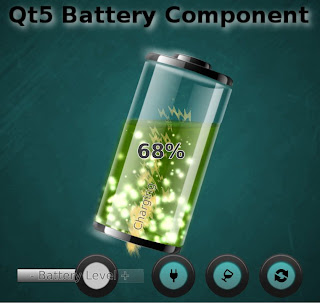
After the QUItIndicator trilogy which introduced idea, design and performance of a specific Qt5 QML component there's room for more, right?! Something like this: This time we have a dynamic QML component for showing the remaining power of your mobile device battery. As a recap, with "Dynamic QML component" I mean someting which utilizes not only basic QML animation properties (position, opacity, scale etc.) but also new Qt5 features (shaders, particles, scenegraph powa!) to appear "more dynamic". Maybe it's just me, but I would love to see UIs really utilizing modern GPUs... and accelerating this progress is one of the reasons why I code these examples and blog about them. Another reason being to rule-the-world, obviously ;-P Instead of explaining design & features of QUItBattery component I'll let this video to do that: If you want to use this liquid battery component in your UI: Download the sources from here , copy QUItBatteryCompone...

QUItIndicators: Design considerations

Image
(This is part II, for the introduction see part I ) The main points of this indicators exercise are to promote Qt5 QML+GLSL approach for building dynamic UI components (part I) and to give performance tips (part III, coming!). But here in the middle, we talk also a bit about design considerations behind these indicators. After all, who cares if your component performs well if it doesn't also look good and fulfil its functionality. Here's set of design-related notes about QUItIndicators which we wanted to achieve: The design language should be relatively neutral. Indicators like these may be used in many places, in applications and games, so they should not be too characteristic. And circles are pretty universal, so circles it is. The amount of circles in BusyIndicator is 11, by design. Reason behind this is that ProgressIndicator has one missing from top to mark start/end position, meaning 10 circles. This is optimal for percentages math e.g. when user sees 4 circles hig...

QUItIndicators: Introduction

Few months ago I wrote a normal mapping series with part I and part II . That was a good experience, so series it is again! This time about implementing dynamic QML components, with an example case being busy&progress indicators. We'll call these specific ones QUItIndicators. Let's start with obligatory video which demonstrates these components, BusyIndicator and ProgressIndicator, with few examples: Traditionally indicators like these would be implemented as an animated GIF or a sprite. Cons of that approach are zero customization and memory consumption: 2s animation of 256x256px 32-bit color indicator at 60fps would mean 2*60*256*256*4 = 31.5Mb memory consumption. That's quite a bit for just one indicator, so usually frames are animated slower than 60fps which makes animation less smooth. Alternative way to implement animated indicator would be using imperative drawing API (QPainter, Cairo, Skia etc.). Drawing freely to a canvas gives a lot of possibilities,...

Qt5 and normal mapping - reloaded

(This is part II of the normal mapping journey, check the part I first for details.) So you have all now played with Qt5 NMapper tool, right? Goody, that means we have gained experience of normal mapping and created some perfectly tuned normal mapped textures. Now it's time to use these in a separate application. Let's assume that you are working on a 2D QML application, but would want 3D-looking effect into some part(s) of the UI. To visualize, here's an example NMapCarousel demo application: (Qt5 NMap Carousel, running on PC and on Raspberry Pi) Here normal mapping is used to make the carousel icons more dynamic by applying lighting. To increase the 3D impression, there are also extra shadows reflected behind the icons. To implement something similar, here's how to proceed: If not already, setup Qt5 to your PC/Mac/RPi or equivalent platform. Create normal maps of your graphic assets using Gimp, Blender, Photoshop etc. tool of your choice. Name the n...

Qt5 and normal mapping

This one has been on my "blog at some point" back burner for some time now... ' Normal mapping ' is a graphics rendering technique used for faking the lighting conditions. In 3D software it is often used for bringing small bumps and dents of textures visible to achieve more realistic graphical appearance without using huge amount of polygons. Normal mapping is kinda advanced version of preceding ' Bump mapping '  technique. Where bump mapping uses just one channel for 'bumps', normal mapping uses 3-channel (RGB) bitmaps and can therefore contain more detailed normal vector information. Normal mapping technique can also be used in 2D applications to get 3D'ish looking UI elements, which means it can be used also in normal non-Qt3D QML applications. Combining image textures with specifically made normal map textures using a suitable shader is all you need. And normal maps can be automatically created with Gimp, Blender, Photoshop etc. drawing too...

Qt5 & Raspberry Pi

I received a Raspberry Pi this week (thanks Nokia & QtonPi!) and naturally baked Qt5 into it as the first thing. Started by just installing premade RPi Qt5 package, but as qmlscene is not yet included, went for building Qt5 following loosely these instructions . About 2 hours later, I had system setup with latest Raspbian image running Qt5 QML apps. Last month when Qt5 first beta was coming together I prepared this " Qt5 Cinematic Experience " technology demo and got some good feedback. Samuel Rødal (btw check out his awesome " Qt 5 based 3D Wayland compositor " video!) kindly tested that it works also in RPi. Yes, it worked and was pretty fast also, but not even close to perfect... Now armed with RPi I wanted to spend some quality time with it, experimenting what the GPU (Broadcom VideoCore IV) likes and hates. So here comes "Qt5 Cinematic Experience - Raspberry Pi Edition": The changes made for this RPi version are: Original version was qu...

Qt5 LedScreen component

Howdy! Do you remember the time before HD, amoled etc. super sharp screens? When pixels were so big that you could easily count them and any colors were luxury? This is your ticket back to these good ol' times: LedScreen Qt5 & QtQuick 2.0 component! Here is a video presenting it with example applications: This component allows you to use any QML content as the source for the ledscreen, define led size and color or use colors from the source item. So it doesn't contain kitchen sink yet, but there's only so much you can fit into 60 lines of QML + GLSL with API documentation.. ;-) Feel free to grab sources from here & modify & use as you want! PS: Hoping to be able to develop & demo Qt5 soon on Raspberry Pi!

Qt5 + Distance Field Effects

Yoann Lopes blogged recently about Text Rendering in the QML Scene Graph using distance field alpha testing. This technique brings smoothly scalable fonts with fast OpenGL rendering to Qt5. Distance field is of course not limited for just fonts (although they are the most usual use-case), same technique can be used also with suitable images. Here is a video of an example application running on PC and N950 which demonstrates the effect: As you can see, the original image becomes quite pixelated when zooming in, which is expected as image is only 256x160 pixels (smiley 64x64 pixels). But enabling smoothing with distance field shader makes it very scalable with nice anti-aliasing, outline and transparency. As the pixmap required for this is so small, GPU / fragment shader has less to process leading to better performance. Like with fonts, adding effects such as outline, smoothing, glow and shadow can be implemented very effectively. This application is under 300 lines of QM...

Qt Contributors' Summit

Image
I will be mostly interested in discussions about Qt5 graphics stack, qml-box2d, QtQuick 2.0 and of course QML Scene Graph. So whenever something related to these is going on, please grab me in!

QML Metaballs

Kimi, the man with excellent genes, blogged few days ago in here about QML extension plugin that provides shader effects for QGraphicsView based Qt Quick 1.x. What makes this magnificent, is the fact that API matches to what QML Scene Graph (at least currently) has, making it a perfect solution to start experimenting with the future. Also, as it is a separate plugin sitting on top of standard Qt 4.7.x, it turns "Qt everywhere" to "shaders everywhere" right now while waiting for the full Scene Graph glory. All you need is 1) Qt 4.7 installed in suitable environment (Linux, Windows, Symbian etc.) 2) the qml1-shadersplugin and 3) imagination for writing QML & GLSL. What I came up with using the plugin is something they call metaballs : Source codes are available in here , go wild! And kudos to Nokia/Qt team for providing this plugin!

Superior technology

I decided not to blog anything right after Nokia & Microsoft deal was published. And I'm glad about that, because I have now reached the state where I'm actually excited again! Volker Hilsheimer made a very good summary about the situation from Qt perspective . Instead of going deep into politics and sales speeches, I decided to approach this from a technical perspective. Keeping things simple and concrete, here's one example UI implemented in few hours with Qt Quick & QML Scene Graph: Please spend a bit time looking at what is really happening in there: wave, colorize, fading, water, text highlight... This is ~300 lines of QML + GLSL, performing smoothly on good ol' N900 hardware. Same can not be done using WP7 Silverlight & XAML, period. Qt is still the best platform for "mobile phones" and we have also here good ingredients for the "future disruption" like Nokia management has outlined. But technology is nothing without a community (a....

QML Scene Graph demo

Here is a small demo of QML animations combined with OpenGL shader effects, running on QML Scene Graph : At first, everything is gray and plain. But once you enable QUIt mode, the whole world feels a lot more colorful and dynamic. Some call this feeling velvet , I call it.. exciting 2011!

Desktop widgets with Qt & QML

Writing desktop widgets for N900 using Qt is now possible, as Harald Fernengel explained yesterday in Qt Labs. What I wanted to test based on this is that can desktop widgets be made also using QML? So I hacked together a Clock widget and with the similar technique also slightly modified Samegame widget: Source code for the simple clock is available in my Gitorious branch so everyone can test and start to build cool Qt QML widgets in no time!

Snowtter + Merry Xmas!

We released today a small application called "Snowtter" to bring N900 users that "Xmas is here, time to relax and enjoy!" - feeling. Basically it just shows Twitter messages related to holiday times, floating around with snowflakes & accelerometer support. But it's the idea that counts, right? =) If you want to see this in your N900: Make sure that you have the necessary Qt libraries installed (libqt4-gui, libqt4-network, libqt4-xml, libqt4-opengl). Qt 4.5 will do, but for better performance and graphics quality Qt 4.6 is highly recommended! (Instructions on how to install latest Qt 4.6 packages from extras-devel here ) Download the application package from here Install the package with "dpkg -i snowtter_1.0_armel.deb". So ssh connection, sudo gainroot or red-pill-mode required (no install-file available for now, sorry) Thanks to all the cool Maemo/Nokia/Qt people for this year and Merry Xmas For Everyone!

WebKit on (multitouch) steroids!

Image
While being in Maemo Summit or in Qt Developer Days, did you notice this guy below? Did you ask from him "Have you been working with multitouch-enabled WebKit lately?" Why not? ;-) Kimi has been working in project called "Starlight" and part of the project is to bring multitouch into WebKit. So while you look at the video below and think "Hmm, just another multitouch photo rotate&scale demo..." please notice that this is all done inside browser with just HTML, CSS & JavaScript! In other words: It's just a normal web page without any black magic. Starlight has now public website here , more videos available in here , and a developer guide with API & examples here . Isn't it just convenient that this was published about simultaneously with the information that Maemo 6 will support multitouch ... Sure beats my lame N810 multitouch hack ! ;-)

Maemo Summit + Qt Dev Days

Image
We got back to Finland last night from our longish Helsinki->Amsterdam->Munich->Helsinki trip! Full load of excellent presentations, nice discussions with people and a strong feeling that things are proceeding into right direction! Blogging with real content later, now I just want to thank everyone for participating!