Posts

Showing posts with the label Android

Qt painting performance with 4 different embedded GPUs (Mali, Adreno, PowerVR)

Image
Summer is approaching, Qt 5.12.2 is out and we wanted to again get concrete painting performance numbers on some lower end embedded SOC GPUs. The kind of chipsets which people are using for embedded devices in multiple places. If user interface contains dynamically painted elements and target is 60fps (or maybe 30fps), how much could you actually paint and which Qt technologies to reach out? To do this testing in easily approachable way, we grabbed 3 cheaper Android™ tablets with different GPUs for testing. Other option would have been different development boards, but those need a bit more setup time and time-to-market (or time-to-blog.. ;-) ) is important to all of us. We also wanted to give Qt 5.12.2 a go while it's hot. So let's first introduce the tablets & chipsets used for this testing: 1) Lenovo Tab 7 Essential, MediaTek MT8167D, GPU: IMG PowerVR GE8300 . This GPU is exactly the same which e.g. Renesas D3 uses, so if you are into automotives this GPU may be ...

Qt 5.10 Rendering Benchmarks

Image
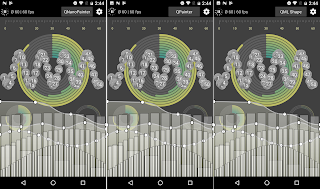
Qt 5.10.0 RC packages are available now and actual release is happening pretty soon. So this seems to be a good time to run some rendering benchmarks with 5.10, including new QML Shape element, QQuickPaintedItem and QNanoPainter . After my previous blog post , some initial comments mentioned how QML Shape didn't reach their performance expectations. But I think that might be more of a "use the right tool for the job" -kind of thing. This demo application is very much designed to test the limits of how much heavily animated graphics can be drawn while keeping performance high and while having its own strengths, QML Shape likely isn't the tool for that. To prove this point, there is a new ' flower ' test case in QNanoPainter demo app which renders a nice flower path, animating gradient color & rotation (but not path). Combining it with new setting to render multiple items (not just multiple renders per item) and the outcome looks like this with 1 and 1...

Qt 5.10 QML Shape testing

Image
When implementing component into QtQuick UI which needs something more than rectangles, images and texts, pure declarative QML hasn't been enough. Popular choices to use for items with some sort of vector drawing are QML Canvas , QQuickPaintedItem  or QNanoPainter . But with Qt 5.10 there will be supports for new Shape  element with paths that contain lines, quads, arcs etc. so I decided to install Qt 5.10 beta3 and implement all tests of "qnanopainter_vs_qpainter_demo" with also QML + Shape elements. ( This kinda makes it "qnanopainter_vs_qpainter_vs_qmlshape_demo" but not renaming now ). So here is in all glory the same UI implemented with QNanoPainter (left), QQuickPaintedItem (center), and QML+Shape (right): Hard to spot the differences right? If only there would be a way to prove this, some way to x-ray into these UIs... like QSG_VISUALIZE=overdraw  to visualize what Qt Quick Scene Graph Renderer sees? Here you can see that scene graph sees QNan...

FitGraph NG UI prototype

Image
About a month ago I started exercising more, mostly jogging, weights and soccer (with kids). Target is to be in superb shape when 2018 starts, and I'm already feeling stronger & more energetic during the day so looking good! Anyway, this blog post is somewhat related to that. There's plenty of health-related apps and gadgets available these days and in the past I used some time pondering what would be a perfect activity tracking app for my needs. Now I decided to revive this earlier concept as 'FitGraph NG' while porting it to use QNanoPainter and polishing some parts. As usual, let's start with a video demonstrating the actual application: There would of course be more views available, this being just the 'activity timeline' part, but it would already cover many of my initial wishes: Showing the whole day as a graph, data or textually depending on needs. Automatic annotation of activities, type, duration and related activity data. And impo...

Unity testing

Image
Couple weeks ago I decided to study a bit about Unity  as I haven't worked with it before. So implemented a simple "Rock Rolling in Terrain" game prototype as a case study, looking like this: By coincidence Marko also just made a nice blog post related to Unity , and thanks to standard assets his terrain even looks quite similar to mine so not going to repeat similar notes. But all in all my initial feeling is that Unity seems quite productive environment and wouldn't mind implementing some bigger project with it to get deeper.

QNanoPainter - a brief update

QNanoPainter has been now publicly available for about a month and during this time has seen some nice improvements. Gunnar first added Windows support, then worked on reducing QNanoQuickItemPainter creation time and memory consumption with multiple items. Niels and Jean-Michaël did some performance testing on Linux & NVIDIA shield, results discussed in issue 6 . Examples Gallery was restructured and now contains 3 examples: QNanoPainter Features, Mouse Event Boxes, and Freehand Painting. Here’s what they look on Nexus 6: (best viewed in HD ) So, if you are working with Qt5 and have a need for custom QQuickItems, I warmly recommend checking out QNanoPainter . Thanks to everyone involved!

QNanoPainter Available!

Image
About 2.5 months ago I introduced QNanoPainter  project for implementing custom QQuickItems. We’ve been really busy (and continue to be so) with other things but took now the time to push QNanoPainter publicly available for wider audience in here: https://github.com/QUItCoding/qnanopainter It’s not ready (as software never is), but already quite capable for serious kicking of tires. Just clone it, build with Qt Creator / qmake and run the provided examples. And when you want to try implementing own items, straightforward instructions to get started are available at front-page README . If you dig it and want to assist in improving QNanoPainter, here are few ideas for patches: We have tested QNanoPainter on OS X, Linux, Android and iOS. What’s missing at least is making it work on Windows (with dynamic OpenGL build of Qt). Documentation with QDoc has been started but it’s not complete. There are plenty of ”TODO: Write more documentation here” comments in classes and docume...

Introducing QNanoPainter

Qt World Summit is just about to start! I’m not participating this time, but wanted to contribute one-more-thing to discuss in UI groups at the heart of Berlin ;) During the past about six months we at QUIt Coding have had a side-side-project called QNanoPainter. This library is designed for implementing custom QQuickItems into Qt5 scene graph. Currently if you want to implement custom Qt Quick item, options are at least: QQuickItem : Offers best performance due to Qt5 scene graph integration. But QSG* classes are relatively low-level with vertices, indices & materials. Painting more complicated things requires quite an expert and even then productivity is not very high. QQuickFramebufferObject : This is a good option if you want to draw with OpenGL into QQuickItem. But as we all know, OpenGL is also quite low-level API so no productivity wins here. QQuickPaintedItem : This means painting with good old QPainter C++ API. Weakness of QPainter with modern graphics accelerated ...

QML and Recursive Shaders

Image
Let's say that you want your Qt5/QML UI to contain sort of a graph. Instead of presenting just the current value, your want user to see few seconds into history how the value has changed. Something like this: To implement the above component with Qt5 & QML, there are at least 3 possibilities: 1) Use QML Canvas and draw the graph using JavaScript. 2) Use QQuickPaintedItem and draw the graph using C++ QPainter APIs. 3) Use QQuickItem and draw using OpenGL and QSG* helpers. First of these is "easiest", no C++ is required but performance and features go along HTML5 canvas API. Second one is good for those familiar with QPainter, but it also has a small performance cost as rendering goes either through QImage or FBO. Third QQuickItem option performs the best and is optimal for Qt5 scene graph, but working with scene graph QSG* classes and OpenGL can feel a bit too low level. As the title of this blog post suggest, there is also a candidate number 4: Use a r...

QUIt demos on Android

Qt 5.2 Beta was released on yesterday, whey! As many of us know already, Qt 5.2 will be the first Qt version with an official Android support. Qt 5.2 will also contain quite a big changes on the UI side, with the new V4 JavaScript engine and the Scene Graph renderer. So how well does this beta run existing Qt Quick 2.0 applications on Android? We have made numerous UI demos in the past so I decided to install Qt 5.2 beta into Nexus 7 (2013) and put it into test! Here's video: Overall I'm impressed by the quality. Qt Creator is able to setup Android projects with ease, things work and performance is very good. What more could one ask? I encourage everyone to test this beta and report bugs so we'll get things close to perfection before 5.2.0 release, due by the end of November. Keep calm and hack on!