Posts

Showing posts with the label QML

Qt Quick 3D DynamicMeters demo
Image
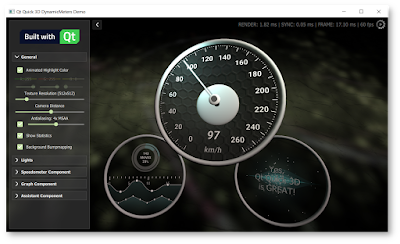
Lately we have been working to perfect the Qt Quick 3D for the 5.15 release. There are still some tweaking to do, but things are looking pretty nice already! In order to prove (to ourselves and to others) that Quick 3D is ready for the prime time, we have also been implementing some demos with it. Tomi already made a blog post about Quick 3D Benchmarking demo here , go check it out if you haven't already. This benchmarking application can be used to test many features of Quick 3D and to evaluate how different hardware can handle the load when the model count, complexity, texture sizes etc. are increased. Another demo we have prepared is called DynamicMeters. The main targets of this demo were: Demonstrate how Quick 3D and Qt Quick (2D) can easily be combined into single UX. While 3D is great, most applications want to combine also traditional 2D elements in different ways. Test how Quick 3D works together with 3rd party OpenGL libraries. Make sure that the performance is ...

Qt painting performance with 4 different embedded GPUs (Mali, Adreno, PowerVR)

Image
Summer is approaching, Qt 5.12.2 is out and we wanted to again get concrete painting performance numbers on some lower end embedded SOC GPUs. The kind of chipsets which people are using for embedded devices in multiple places. If user interface contains dynamically painted elements and target is 60fps (or maybe 30fps), how much could you actually paint and which Qt technologies to reach out? To do this testing in easily approachable way, we grabbed 3 cheaper Android™ tablets with different GPUs for testing. Other option would have been different development boards, but those need a bit more setup time and time-to-market (or time-to-blog.. ;-) ) is important to all of us. We also wanted to give Qt 5.12.2 a go while it's hot. So let's first introduce the tablets & chipsets used for this testing: 1) Lenovo Tab 7 Essential, MediaTek MT8167D, GPU: IMG PowerVR GE8300 . This GPU is exactly the same which e.g. Renesas D3 uses, so if you are into automotives this GPU may be ...

Using QNanoPainter without QtQuick (pure C++)

Image
Originally, QNanoPainter library was implemented to fulfill the needs of easy to use but performant custom OpenGL QQuickItems. For the needs, Qt Quick Scene graph QSG* classes felt a bit too low-level to be productive, while QQuickPaintedItem was slightly lacking in performance and rendering quality on mobile hardware. For more details, please read this QNanoPainter introduction blog post. I like (OK, love ) Qt Quick & QML and have used them successfully in many different projects. On desktop, mobile and embedded software. A lot. But Qt Quick doesn't suit all situations or it is not always required. As explained in this Qt blog post, Qt 5.12 improves Qt Quick performance and memory usage. But naturally there still is some memory and startup time additions coming from Qt Quick engine. Fear not, QNanoPainter can be used also without Qt Quick. Available entry points are: QNanoQuickItem & QNanoQuickItemPainter - This is where it all started, use these to implement your ...

Qt 5.10 Windows Rendering Benchmarks

Image
At the end of the previous blog post  I promised to do a follow-up about Windows side rendering performance. So here we go. But before that, let's revisit one earlier case. Previously decided to provide results with and without "Bezier lines" test because it seemed to perform particularly poorly when rendered using QML Shape backend. Instead of just letting this one go, I decided to dig a bit deeper to try to improve QML Shape performance. After all, just disabling slow tests doesn't sound like a preferred long-term plan... ;-) Improving QML Shape paths performance After some trial and error, found out that QQuickPath::createPath() uses considerable amount of time every time path changes and reason is in QPainterPath::length() which e.g. for all curved paths calls QBezier::length(). This isn't usually problem for PathView  as its normal use-case is creating path once and then just moving elements along the path. But new ShapePath  on the other hand might be ...

Qt 5.10 Rendering Benchmarks

Image
Qt 5.10.0 RC packages are available now and actual release is happening pretty soon. So this seems to be a good time to run some rendering benchmarks with 5.10, including new QML Shape element, QQuickPaintedItem and QNanoPainter . After my previous blog post , some initial comments mentioned how QML Shape didn't reach their performance expectations. But I think that might be more of a "use the right tool for the job" -kind of thing. This demo application is very much designed to test the limits of how much heavily animated graphics can be drawn while keeping performance high and while having its own strengths, QML Shape likely isn't the tool for that. To prove this point, there is a new ' flower ' test case in QNanoPainter demo app which renders a nice flower path, animating gradient color & rotation (but not path). Combining it with new setting to render multiple items (not just multiple renders per item) and the outcome looks like this with 1 and 1...

Qt 5.10 QML Shape testing

Image
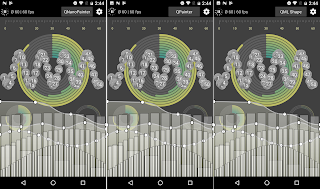
When implementing component into QtQuick UI which needs something more than rectangles, images and texts, pure declarative QML hasn't been enough. Popular choices to use for items with some sort of vector drawing are QML Canvas , QQuickPaintedItem  or QNanoPainter . But with Qt 5.10 there will be supports for new Shape  element with paths that contain lines, quads, arcs etc. so I decided to install Qt 5.10 beta3 and implement all tests of "qnanopainter_vs_qpainter_demo" with also QML + Shape elements. ( This kinda makes it "qnanopainter_vs_qpainter_vs_qmlshape_demo" but not renaming now ). So here is in all glory the same UI implemented with QNanoPainter (left), QQuickPaintedItem (center), and QML+Shape (right): Hard to spot the differences right? If only there would be a way to prove this, some way to x-ray into these UIs... like QSG_VISUALIZE=overdraw  to visualize what Qt Quick Scene Graph Renderer sees? Here you can see that scene graph sees QNan...

FitGraph NG UI prototype

Image
About a month ago I started exercising more, mostly jogging, weights and soccer (with kids). Target is to be in superb shape when 2018 starts, and I'm already feeling stronger & more energetic during the day so looking good! Anyway, this blog post is somewhat related to that. There's plenty of health-related apps and gadgets available these days and in the past I used some time pondering what would be a perfect activity tracking app for my needs. Now I decided to revive this earlier concept as 'FitGraph NG' while porting it to use QNanoPainter and polishing some parts. As usual, let's start with a video demonstrating the actual application: There would of course be more views available, this being just the 'activity timeline' part, but it would already cover many of my initial wishes: Showing the whole day as a graph, data or textually depending on needs. Automatic annotation of activities, type, duration and related activity data. And impo...

QNanoPainter with Qt 5.8 (and QSGRenderNode)

Image
QNanoPainter  recently gained initial support for QSGRenderNode  which is a new public class available starting from Qt 5.8. What this means is that instead of rendering through FBO using QQuickFramebufferObject  so, OpenGL drawing is done directly into Qt Quick Scene Graph. And as a QQuickItem somewhere in the middle of scene, not just underlay/overlay for the scene which was already possible before Qt 5.8 using beforeRendering  & afterRendering . Below is a video running QNanoPainter tester app on MacBook Pro with 16 unique QQuickItems using QSGRenderNode mode: So should you enable QNANO_USE_RENDERNODE with your custom QNanoPainter items? There is a potential performance gain for not rendering through FBO. Especially if your UI contains many custom items and/or you resize items, QSGRenderNode may give more gains as FBO resizing can be costly. However, based on my testing with few different Android devices the performance difference seems pretty smal...

QNanoPainter - a brief update

QNanoPainter has been now publicly available for about a month and during this time has seen some nice improvements. Gunnar first added Windows support, then worked on reducing QNanoQuickItemPainter creation time and memory consumption with multiple items. Niels and Jean-Michaël did some performance testing on Linux & NVIDIA shield, results discussed in issue 6 . Examples Gallery was restructured and now contains 3 examples: QNanoPainter Features, Mouse Event Boxes, and Freehand Painting. Here’s what they look on Nexus 6: (best viewed in HD ) So, if you are working with Qt5 and have a need for custom QQuickItems, I warmly recommend checking out QNanoPainter . Thanks to everyone involved!

QNanoPainter Available!

Image
About 2.5 months ago I introduced QNanoPainter  project for implementing custom QQuickItems. We’ve been really busy (and continue to be so) with other things but took now the time to push QNanoPainter publicly available for wider audience in here: https://github.com/QUItCoding/qnanopainter It’s not ready (as software never is), but already quite capable for serious kicking of tires. Just clone it, build with Qt Creator / qmake and run the provided examples. And when you want to try implementing own items, straightforward instructions to get started are available at front-page README . If you dig it and want to assist in improving QNanoPainter, here are few ideas for patches: We have tested QNanoPainter on OS X, Linux, Android and iOS. What’s missing at least is making it work on Windows (with dynamic OpenGL build of Qt). Documentation with QDoc has been started but it’s not complete. There are plenty of ”TODO: Write more documentation here” comments in classes and docume...

Introducing QNanoPainter

Qt World Summit is just about to start! I’m not participating this time, but wanted to contribute one-more-thing to discuss in UI groups at the heart of Berlin ;) During the past about six months we at QUIt Coding have had a side-side-project called QNanoPainter. This library is designed for implementing custom QQuickItems into Qt5 scene graph. Currently if you want to implement custom Qt Quick item, options are at least: QQuickItem : Offers best performance due to Qt5 scene graph integration. But QSG* classes are relatively low-level with vertices, indices & materials. Painting more complicated things requires quite an expert and even then productivity is not very high. QQuickFramebufferObject : This is a good option if you want to draw with OpenGL into QQuickItem. But as we all know, OpenGL is also quite low-level API so no productivity wins here. QQuickPaintedItem : This means painting with good old QPainter C++ API. Weakness of QPainter with modern graphics accelerated ...

QML and Recursive Shaders

Image
Let's say that you want your Qt5/QML UI to contain sort of a graph. Instead of presenting just the current value, your want user to see few seconds into history how the value has changed. Something like this: To implement the above component with Qt5 & QML, there are at least 3 possibilities: 1) Use QML Canvas and draw the graph using JavaScript. 2) Use QQuickPaintedItem and draw the graph using C++ QPainter APIs. 3) Use QQuickItem and draw using OpenGL and QSG* helpers. First of these is "easiest", no C++ is required but performance and features go along HTML5 canvas API. Second one is good for those familiar with QPainter, but it also has a small performance cost as rendering goes either through QImage or FBO. Third QQuickItem option performs the best and is optimal for Qt5 scene graph, but working with scene graph QSG* classes and OpenGL can feel a bit too low level. As the title of this blog post suggest, there is also a candidate number 4: Use a r...

QUIt demos on Android

Qt 5.2 Beta was released on yesterday, whey! As many of us know already, Qt 5.2 will be the first Qt version with an official Android support. Qt 5.2 will also contain quite a big changes on the UI side, with the new V4 JavaScript engine and the Scene Graph renderer. So how well does this beta run existing Qt Quick 2.0 applications on Android? We have made numerous UI demos in the past so I decided to install Qt 5.2 beta into Nexus 7 (2013) and put it into test! Here's video: Overall I'm impressed by the quality. Qt Creator is able to setup Android projects with ease, things work and performance is very good. What more could one ask? I encourage everyone to test this beta and report bugs so we'll get things close to perfection before 5.2.0 release, due by the end of November. Keep calm and hack on!

Qt5 Battery Component

Image
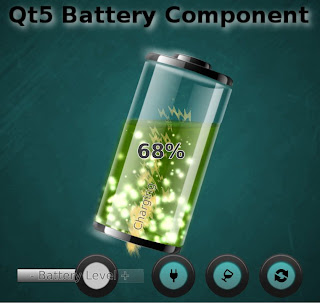
After the QUItIndicator trilogy which introduced idea, design and performance of a specific Qt5 QML component there's room for more, right?! Something like this: This time we have a dynamic QML component for showing the remaining power of your mobile device battery. As a recap, with "Dynamic QML component" I mean someting which utilizes not only basic QML animation properties (position, opacity, scale etc.) but also new Qt5 features (shaders, particles, scenegraph powa!) to appear "more dynamic". Maybe it's just me, but I would love to see UIs really utilizing modern GPUs... and accelerating this progress is one of the reasons why I code these examples and blog about them. Another reason being to rule-the-world, obviously ;-P Instead of explaining design & features of QUItBattery component I'll let this video to do that: If you want to use this liquid battery component in your UI: Download the sources from here , copy QUItBatteryCompone...

QUItIndicators: Performance considerations

(This is part III, please check also parts I and II ) Even with a small component like this, there are plenty of possibilities to improve (or sink) the performance. To make sure that our indicators perform as expected, we'll test them on Nokia N9 and and on Raspberry Pi. These both devices are relatively low-end by current standards. N9 contains 1GHz Cortex-A8 CPU which is still quite beefy, but GPU (SGX530) on the other hand is getting old and unable to handle more complicated fragment shaders. For RPi these are just the opposite: CPU is slowish 700MHz ARM11 while the GPU (VideoCore IV) is more performant than N9 SGX530. Because of these qualities (and because both support Qt5, naturally) this duo is excellent for our performance ensurement. So here's a short video showing how our indicators perform on Nokia N9 and on RaspberryPi: Performs pretty OK on both, right? ProgressIndicator stress test isn't smooth on RPi, which indicates that its CPU can't handle...

QUItIndicators: Design considerations

Image
(This is part II, for the introduction see part I ) The main points of this indicators exercise are to promote Qt5 QML+GLSL approach for building dynamic UI components (part I) and to give performance tips (part III, coming!). But here in the middle, we talk also a bit about design considerations behind these indicators. After all, who cares if your component performs well if it doesn't also look good and fulfil its functionality. Here's set of design-related notes about QUItIndicators which we wanted to achieve: The design language should be relatively neutral. Indicators like these may be used in many places, in applications and games, so they should not be too characteristic. And circles are pretty universal, so circles it is. The amount of circles in BusyIndicator is 11, by design. Reason behind this is that ProgressIndicator has one missing from top to mark start/end position, meaning 10 circles. This is optimal for percentages math e.g. when user sees 4 circles hig...

QUItIndicators: Introduction

Few months ago I wrote a normal mapping series with part I and part II . That was a good experience, so series it is again! This time about implementing dynamic QML components, with an example case being busy&progress indicators. We'll call these specific ones QUItIndicators. Let's start with obligatory video which demonstrates these components, BusyIndicator and ProgressIndicator, with few examples: Traditionally indicators like these would be implemented as an animated GIF or a sprite. Cons of that approach are zero customization and memory consumption: 2s animation of 256x256px 32-bit color indicator at 60fps would mean 2*60*256*256*4 = 31.5Mb memory consumption. That's quite a bit for just one indicator, so usually frames are animated slower than 60fps which makes animation less smooth. Alternative way to implement animated indicator would be using imperative drawing API (QPainter, Cairo, Skia etc.). Drawing freely to a canvas gives a lot of possibilities,...