Posts

QNanoPainter - a brief update

QNanoPainter has been now publicly available for about a month and during this time has seen some nice improvements. Gunnar first added Windows support, then worked on reducing QNanoQuickItemPainter creation time and memory consumption with multiple items. Niels and Jean-MichaĆ«l did some performance testing on Linux & NVIDIA shield, results discussed in issue 6 . Examples Gallery was restructured and now contains 3 examples: QNanoPainter Features, Mouse Event Boxes, and Freehand Painting. Here’s what they look on Nexus 6: (best viewed in HD ) So, if you are working with Qt5 and have a need for custom QQuickItems, I warmly recommend checking out QNanoPainter . Thanks to everyone involved!

QNanoPainter Available!

Image
About 2.5 months ago I introduced QNanoPainter  project for implementing custom QQuickItems. We’ve been really busy (and continue to be so) with other things but took now the time to push QNanoPainter publicly available for wider audience in here: https://github.com/QUItCoding/qnanopainter It’s not ready (as software never is), but already quite capable for serious kicking of tires. Just clone it, build with Qt Creator / qmake and run the provided examples. And when you want to try implementing own items, straightforward instructions to get started are available at front-page README . If you dig it and want to assist in improving QNanoPainter, here are few ideas for patches: We have tested QNanoPainter on OS X, Linux, Android and iOS. What’s missing at least is making it work on Windows (with dynamic OpenGL build of Qt). Documentation with QDoc has been started but it’s not complete. There are plenty of ”TODO: Write more documentation here” comments in classes and docume...

Introducing QNanoPainter

Qt World Summit is just about to start! I’m not participating this time, but wanted to contribute one-more-thing to discuss in UI groups at the heart of Berlin ;) During the past about six months we at QUIt Coding have had a side-side-project called QNanoPainter. This library is designed for implementing custom QQuickItems into Qt5 scene graph. Currently if you want to implement custom Qt Quick item, options are at least: QQuickItem : Offers best performance due to Qt5 scene graph integration. But QSG* classes are relatively low-level with vertices, indices & materials. Painting more complicated things requires quite an expert and even then productivity is not very high. QQuickFramebufferObject : This is a good option if you want to draw with OpenGL into QQuickItem. But as we all know, OpenGL is also quite low-level API so no productivity wins here. QQuickPaintedItem : This means painting with good old QPainter C++ API. Weakness of QPainter with modern graphics accelerated ...

QML and Recursive Shaders

Image
Let's say that you want your Qt5/QML UI to contain sort of a graph. Instead of presenting just the current value, your want user to see few seconds into history how the value has changed. Something like this: To implement the above component with Qt5 & QML, there are at least 3 possibilities: 1) Use QML Canvas and draw the graph using JavaScript. 2) Use QQuickPaintedItem and draw the graph using C++ QPainter APIs. 3) Use QQuickItem and draw using OpenGL and QSG* helpers. First of these is "easiest", no C++ is required but performance and features go along HTML5 canvas API. Second one is good for those familiar with QPainter, but it also has a small performance cost as rendering goes either through QImage or FBO. Third QQuickItem option performs the best and is optimal for Qt5 scene graph, but working with scene graph QSG* classes and OpenGL can feel a bit too low level. As the title of this blog post suggest, there is also a candidate number 4: Use a r...

QUIt demos on Android

Qt 5.2 Beta was released on yesterday, whey! As many of us know already, Qt 5.2 will be the first Qt version with an official Android support. Qt 5.2 will also contain quite a big changes on the UI side, with the new V4 JavaScript engine and the Scene Graph renderer. So how well does this beta run existing Qt Quick 2.0 applications on Android? We have made numerous UI demos in the past so I decided to install Qt 5.2 beta into Nexus 7 (2013) and put it into test! Here's video: Overall I'm impressed by the quality. Qt Creator is able to setup Android projects with ease, things work and performance is very good. What more could one ask? I encourage everyone to test this beta and report bugs so we'll get things close to perfection before 5.2.0 release, due by the end of November. Keep calm and hack on!

Qt5 Battery Component

Image
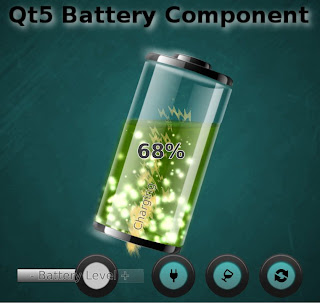
After the QUItIndicator trilogy which introduced idea, design and performance of a specific Qt5 QML component there's room for more, right?! Something like this: This time we have a dynamic QML component for showing the remaining power of your mobile device battery. As a recap, with "Dynamic QML component" I mean someting which utilizes not only basic QML animation properties (position, opacity, scale etc.) but also new Qt5 features (shaders, particles, scenegraph powa!) to appear "more dynamic". Maybe it's just me, but I would love to see UIs really utilizing modern GPUs... and accelerating this progress is one of the reasons why I code these examples and blog about them. Another reason being to rule-the-world, obviously ;-P Instead of explaining design & features of QUItBattery component I'll let this video to do that: If you want to use this liquid battery component in your UI: Download the sources from here , copy QUItBatteryCompone...

QUItIndicators: Performance considerations

(This is part III, please check also parts I and II ) Even with a small component like this, there are plenty of possibilities to improve (or sink) the performance. To make sure that our indicators perform as expected, we'll test them on Nokia N9 and and on Raspberry Pi. These both devices are relatively low-end by current standards. N9 contains 1GHz Cortex-A8 CPU which is still quite beefy, but GPU (SGX530) on the other hand is getting old and unable to handle more complicated fragment shaders. For RPi these are just the opposite: CPU is slowish 700MHz ARM11 while the GPU (VideoCore IV) is more performant than N9 SGX530. Because of these qualities (and because both support Qt5, naturally) this duo is excellent for our performance ensurement. So here's a short video showing how our indicators perform on Nokia N9 and on RaspberryPi: Performs pretty OK on both, right? ProgressIndicator stress test isn't smooth on RPi, which indicates that its CPU can't handle...